
Realme is continuously rolling out the Android 16-based Realme UI 7 beta programs to its devices. More than half of eligible Realme devices have already joined the beta program, and now it begins for 11 more smartphones.
The beta program allows users to experience all new functions ahead of the Realme UI 7 stable version but with bugs and issues. Users are recommended to not install beta programs on their daily driver Realme phones, as it may affect their work or their important data.
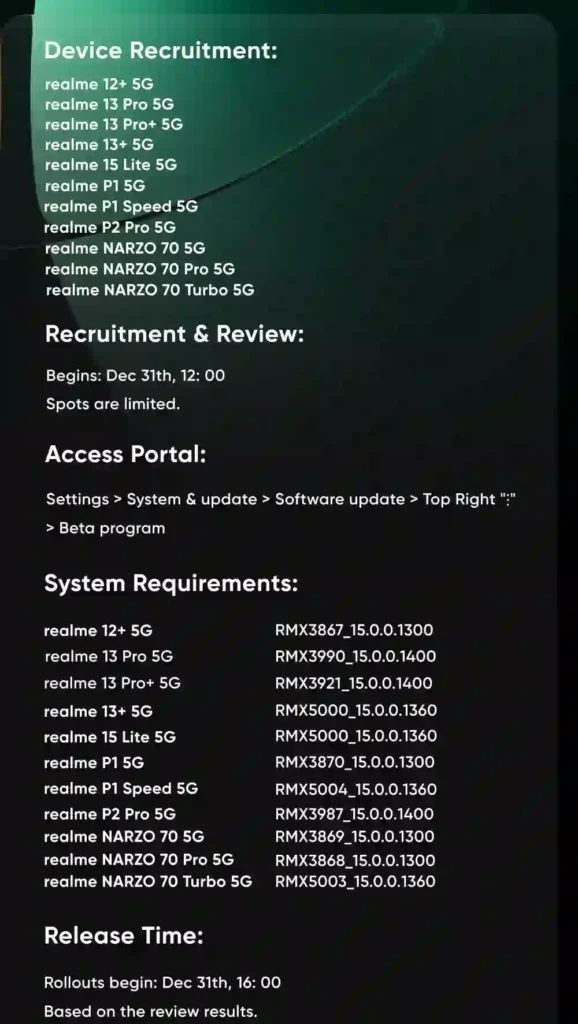
Before the beta application, users must update their device to the required Realme UI version. These 11 Realme devices and their required UI versions are listed below.
- realme 15 Lite 5G: RMX5000_15.0.0.1360
- realme 13 Pro+ 5G: RMX3921_15.0.0.1400
- realme 13 Pro 5G: RMX3990_15.0.0.1400
- realme 13+ 5G: RMX5000_15.0.0.1360
- realme 12+ 5G: RMX3867_15.0.0.1300
- realme P2 Pro 5G: RMX3987_15.0.0.1400
- realme P1 5G: RMX3870_15.0.0.1300
- realme P1 Speed 5G: RMX5004_15.0.0.1360
- realme NARZO 70 Turbo 5G: RMX5003_15.0.0.1360
- realme narzo 70 Pro 5G: RMX3868_15.0.0.1300
- realme narzo 70 5G: RMX3869_15.0.0.1300
How to join
To join the Realme UI 7 beta program, firstly, users have to complete the beta program application form. To do that, go to Settings > System & Updates > Software Update > ⋮ > Beta program.
How to download
After the beta form application, you will have to wait for official approval. As your application approves, an OTA software update will arrive; then just download it and install it. Keep in mind that sometimes the approval may take a couple of days.